
The EPFO Passbook is an online record that shows all transactions linked to an employee’s Provident Fund (PF) account. Managed by the Employees’ Provident Fund Organisation, it provides members with a clear and organized view of their PF savings and contribution history.
After completing the EPFO Login using the Universal Account Number (UAN), members can easily access their passbook through the Unified Member Portal. This online feature allows employees to check monthly contributions made by both the employee and the employer, ensuring transparency and helping members keep track of their retirement savings.
What is EPFO Member Passbook?
The EPFO Member Passbook functions much like a bank statement but is designed specifically for tracking transactions in your Provident Fund account. Managed by the Employees’ Provident Fund Organisation, it offers a clear summary of all PF-related financial records linked to your Universal Account Number (UAN).
The passbook typically includes the following details:
- Monthly employee contribution
- Monthly employer contribution
- Share allocated to the Employee Pension Scheme (EPS)
- Annual interest credited to the account
- Total accumulated PF balance
Members can access this service online anytime after completing a secure login on the EPFO portal, making it easy to monitor contributions and track their provident fund savings.
How to Access EPFO Passbook Login?
Members can view their EPFO passbook through the Unified Member Portal by following these simple steps:
- Visit the official website of the Employees’ Provident Fund Organisation at https://www.epfindia.gov.in.
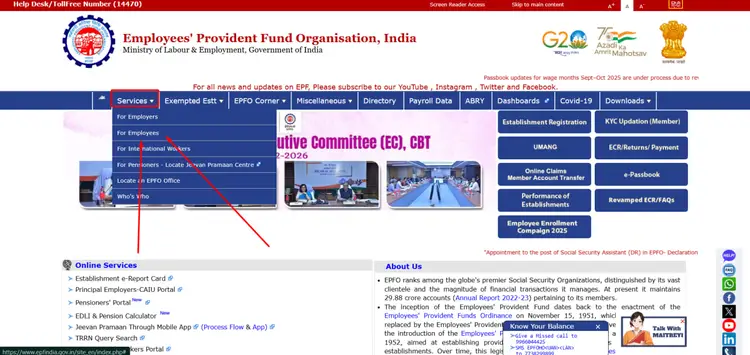
- Go to the “Services” section available for employees.
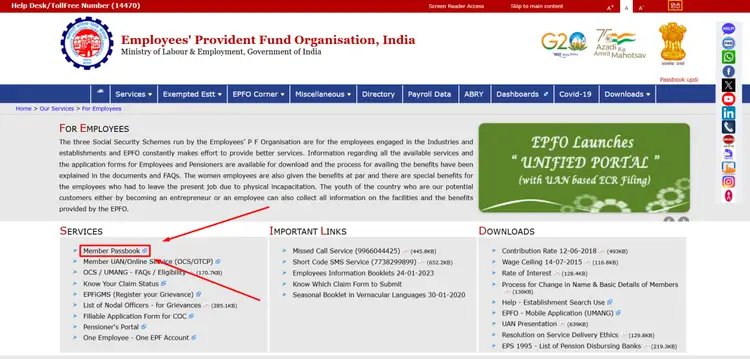
- Click on the “Member Passbook” option.
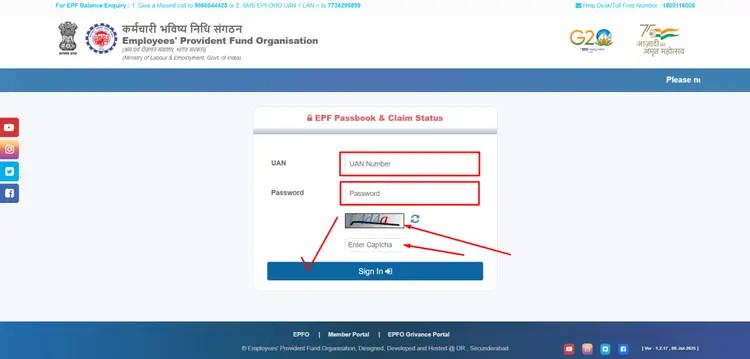
- Log in using your UAN and password.
- Enter the OTP received on your registered mobile number to verify your identity.
Once the verification is completed, the passbook will open and display all transaction details, including monthly contributions, interest credits, and the total Provident Fund balance.
EPFO Contribution Percentage Details
Under the Employees’ Provident Fund (EPF) scheme, both the employee and the employer contribute 12% of the employee’s Basic Salary plus Dearness Allowance (DA) toward the Provident Fund. This system is managed by the Employees’ Provident Fund Organisation.
While the employee’s entire 12% contribution goes directly into the Provident Fund account, the employer’s 12% contribution is divided into two different components as per the EPF structure.
| Contribution Type | Percentage (%) | Description |
|---|---|---|
| Employee Contribution (EPF) | 12% | Fully deposited into the employee’s EPF account |
| Employer Contribution – EPF Share | 3.67% | Added to the EPF balance |
| Employer Contribution – EPS Share | 8.33% | Allocated to the Employee Pension Scheme (EPS) |
| Total Monthly Contribution | 24% (12% + 12%) | Combined contribution made by the employee and employer |
The EPS contribution (8.33%) is calculated based on a monthly wage ceiling of ₹15,000. As a result, the maximum amount that can be contributed to the Employee Pension Scheme (EPS) is ₹1,250 per month. If there is any remaining portion of the employer’s contribution beyond this limit, it is credited to the employee’s EPF account.
Information Available in EPFO Passbook
The EPFO passbook offers a clear summary of all financial activities related to a member’s Provident Fund account. Managed by the Employees’ Provident Fund Organisation, it helps members easily review their PF contributions and overall balance.
The passbook typically includes the following details:
- Month-wise employee contribution
- Employer contribution information
- Allocation toward the Employee Pension Scheme (EPS)
- Annual interest credited to the account
- Updated total PF balance
This organized format improves transparency and enables members to verify that their employer is depositing PF contributions regularly.
Download EPFO Passbook PDF
Members can also download their EPFO passbook for future reference and documentation. This service is provided through the portal managed by the Employees’ Provident Fund Organisation.
Follow these steps to download the passbook:
- Open the Passbook section after logging in to your account.
- Click on the Download option available on the page.
- Save the PDF file to your device for easy access.
The downloaded passbook can be useful for financial planning, record keeping, or verification purposes whenever required.
Importance of Checking EPFO Passbook Regularly
Reviewing your EPFO passbook on a regular basis can help you stay informed about your Provident Fund account activity. The system is managed by the Employees’ Provident Fund Organisation and provides a transparent record of all PF transactions.
By checking your passbook frequently, you can:
- Confirm that your employer is depositing monthly contributions
- Track the growth of your PF balance over time
- Monitor annual interest credited to your account
- Plan future withdrawals or submit online claims when needed
- Ensure that all PF records are accurate and up to date
Keeping track of your Provident Fund transactions supports better financial awareness and helps strengthen long-term savings and retirement planning.
Frequently Asked Questions (FAQs)
What is an EPFO passbook?
An EPFO passbook is an online statement that records all transactions related to your Provident Fund account, including employee contributions, employer contributions, and interest credited by the Employees’ Provident Fund Organisation.
How can I check my EPFO passbook online?
You can view your passbook by logging in to the EPFO Member Portal using your Universal Account Number (UAN) and password. After authentication, you can access the passbook section to see all PF transactions.
Can I download my EPFO passbook?
Yes, members can download their EPFO passbook in PDF format from the passbook section after logging in to the portal. This file can be saved for record-keeping or verification purposes.
Why is it important to check the EPFO passbook regularly?
Checking the passbook regularly helps members verify employer deposits, monitor PF balance growth, confirm interest credits, and ensure that all records in the Provident Fund account are accurate.