
Employees enrolled under the Employees’ Provident Fund (EPF) scheme can access their provident fund account through the EPFO Member Login portal using their Universal Account Number (UAN). After logging in, members can check their PF balance, download passbook details, and use various provident fund services online.
The portal dashboard allows employees to view contribution history, monitor claim status, and manage account-related services through the EPFO Login system, eliminating the need to visit government offices in person.
What is EPFO Member Login?
EPFO Member Login is the secure sign-in process that allows employees to access their provident fund account online. Every employee registered under the EPF scheme is provided with a Universal Account Number (UAN), which serves as the primary login credential.
Once the EPFO Member Login process is completed, users can access their account dashboard to check their PF balance, review contribution details, and view employment-related records.
How to Access EPFO Member Login?
Employees can log in to their account by following these steps:
- Visit the official Provident Fund website.
- Go to the Employee Services section.
- Click on Member UAN Login.
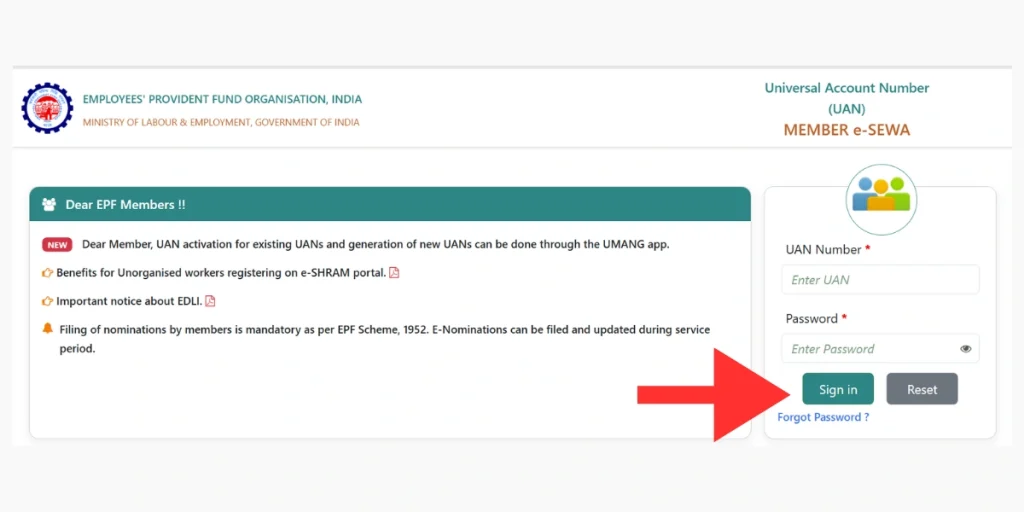
- Enter your UAN number and password.
- Select Sign In to continue.
Once the EPFO Member Login process is completed, the account dashboard will open, allowing users to access various PF-related services.
Member Portal Dashboard Overview
After signing in, users are directed to the account dashboard, where important details such as PF contribution records, employment history, and claim status are displayed.
Through the EPFO Member Portal, employees can also use services like downloading the passbook, updating KYC information, and submitting claims online.
Services Available After Login
| Service | Purpose |
|---|---|
| PF Balance Check | View total PF contributions |
| EPFO Passbook Download | Access PF transaction history |
| Online Claim | Submit PF withdrawal request |
| KYC Update | Update Aadhaar, PAN, and bank details |
| Service History | Review employment records |
Difference Between Member Login and Employer Login
Employees use the EPFO Member Login to access their provident fund accounts and view personal PF details. In contrast, organizations handle employee contributions and compliance tasks through the EPFO Employer Login system.
This separate login structure allows both employees and employers to securely manage their respective responsibilities related to provident fund services.
Frequently Asked Questions (FAQs)
What is the UAN used for in EPFO Member Login?
The Universal Account Number (UAN) is a unique identification number provided to every EPF member. It is used to log in to the EPFO Member Portal and access PF account services online.
Can I check my PF balance after logging in?
Yes, after completing the EPFO Member Login process, users can check their PF balance directly from the account dashboard.
Is it possible to download the PF passbook online?
Yes, members can download their PF passbook from the portal after logging in. The passbook shows detailed information about monthly contributions and transactions.
What should I do if I forget my EPFO login password?
If you forget your password, you can use the “Forgot Password” option on the login page and reset it using your registered mobile number linked with the UAN.