
EPFO Employer Login allows registered establishments to securely access the Unified Portal and manage their Provident Fund (PF) obligations online. While employees use the EPFO Login to view their PF details, the employer portal is designed for organizations to handle tasks such as submitting contributions, uploading returns, and maintaining employee records in a digital format.
This online system helps businesses across India maintain transparency, accuracy, and timely compliance with Provident Fund regulations.
What is EPFO Employer Login?
The EPFO Employer Login portal is created for organizations registered under the Employees’ Provident Fund (EPF) scheme. It enables authorized company representatives to complete important PF-related administrative tasks online.
Using this portal, employers can submit monthly contributions, track compliance requirements, and maintain accurate PF records for their employees in a secure digital system.
How to Access Employer Portal
- Visit the EPFO Unified Portal at https://www.epfindia.gov.in/site_en/index.php
- Go to the Services section.
- Click on For Employers.
- Select Online ECR / Challan Submission / OTCP.
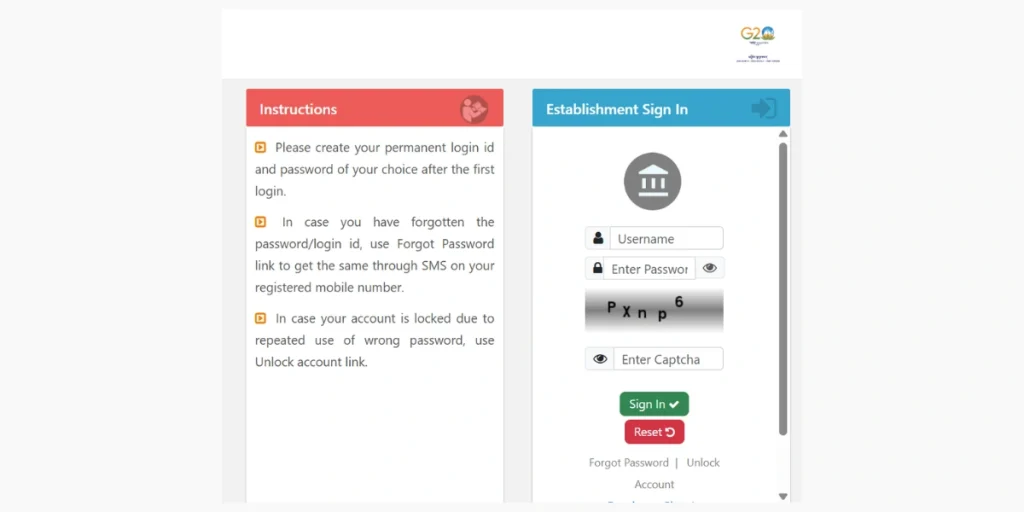
- Enter your registered username and password.
- Complete the captcha verification.
- Click on Sign In.
After logging in successfully, the employer dashboard will appear, where you can manage PF-related services.
Required Login Credentials
Before accessing the portal, make sure you have the following details ready:
- Establishment ID
- Registered employer username
- Password
- Captcha code
Services Available After Login
Once logged into the employer portal, the following services can be accessed:
| Service | Purpose |
|---|---|
| ECR Upload | Submission of monthly Electronic Challan-cum-Return |
| Online Challan Payment | Payment of PF contributions |
| Employee Record Management | Add or update employee information |
| Payment History | View previous PF payments |
| Compliance Status | Monitor filing and contribution status |
Employer Login and Employee Login – Functional Difference
| Feature | Employer Portal | Employee Portal |
|---|---|---|
| User Type | Establishment / Company | Individual Member |
| Contribution Submission | Yes | No |
| ECR Filing | Yes | No |
| EPFO Passbook Access | No | Yes |
| Online Claim Filing | No | Yes |
Both portals operate independently to ensure secure and role-based access.
Common Login Issues
| Issue | Resolution |
|---|---|
| Forgot Password | Use the password recovery option |
| Incorrect Captcha | Refresh the page and re-enter the captcha |
| Invalid Credentials | Verify the Establishment ID and username |
| Account Locked | Use the account unlock option or contact EPFO support |
Why Employers Use the EPFO Employer Portal
The EPFO Employer Portal makes Provident Fund administration easier by enabling establishments to handle compliance tasks online. Instead of managing paperwork or submitting physical documents, employers can complete most EPF-related activities through a digital system.
Key benefits include:
- Quick and convenient submission of PF contributions
- Online generation of challans
- Digital management of employee records
- Easy access to previous payment history
- Greater transparency in PF compliance and reporting
Frequently Asked Questions (FAQs)
Who can use the EPFO Employer Login portal?
The EPFO Employer Login portal is available for establishments registered under the EPF scheme. Authorized representatives of the organization can access the portal to manage PF-related activities.
What is ECR in the EPFO Employer Portal?
ECR (Electronic Challan-cum-Return) is a system used by employers to submit monthly PF contribution details and employee salary information online.
What should I do if I forget my employer login password?
If you forget your password, you can use the Forgot Password option on the login page to reset it by following the verification process.
Can employers update employee details through the portal?
Yes, employers can add new employees, update existing employee information, and maintain accurate PF records through the EPFO Employer Portal.